所有 pod 列表
 1
 2
 3
 4
 5
 6
 7
 8
 9
10
11
12
13
14
15
16
17
18
19
20
21
22
23
24
25
26
27
28
29
30
31
32
|
NAME
csi-attacher-86667d54d8-cjls4
csi-attacher-86667d54d8-l4rt2
csi-attacher-86667d54d8-swffr
csi-provisioner-7f5cdcc588-9f8sx
csi-provisioner-7f5cdcc588-md7wc
csi-provisioner-7f5cdcc588-t6qxh
csi-resizer-7464667cc9-4bcfn
csi-resizer-7464667cc9-6hngm
csi-resizer-7464667cc9-m6vrx
csi-snapshotter-65966f9f7c-rhrj9
csi-snapshotter-65966f9f7c-s2d5d
csi-snapshotter-65966f9f7c-z2rjp
engine-image-ei-2119e05b-75mwb
engine-image-ei-2119e05b-7cdck
engine-image-ei-2119e05b-8gplm
engine-image-ei-2119e05b-tcn4z
instance-manager-d796d163ff74d4fe5699bc94b2067382
instance-manager-f5911f21361a32f1a19d2f2d151926f8
instance-manager-fa75e413438c8fe2abf93aa7b5d70ec6
longhorn-csi-plugin-fj7kz
longhorn-csi-plugin-pjq45
longhorn-csi-plugin-w8tsr
longhorn-csi-plugin-z55z5
longhorn-driver-deployer-7b4874d97d-vwds8
longhorn-manager-4f65r
longhorn-manager-5xfk8
longhorn-manager-k8c2f
longhorn-manager-twxkq
longhorn-ui-6944b75d68-9rcd9
longhorn-ui-6944b75d68-vk768
nfs-client-provisioner-5f597f65bc-bl5vd
|
架构
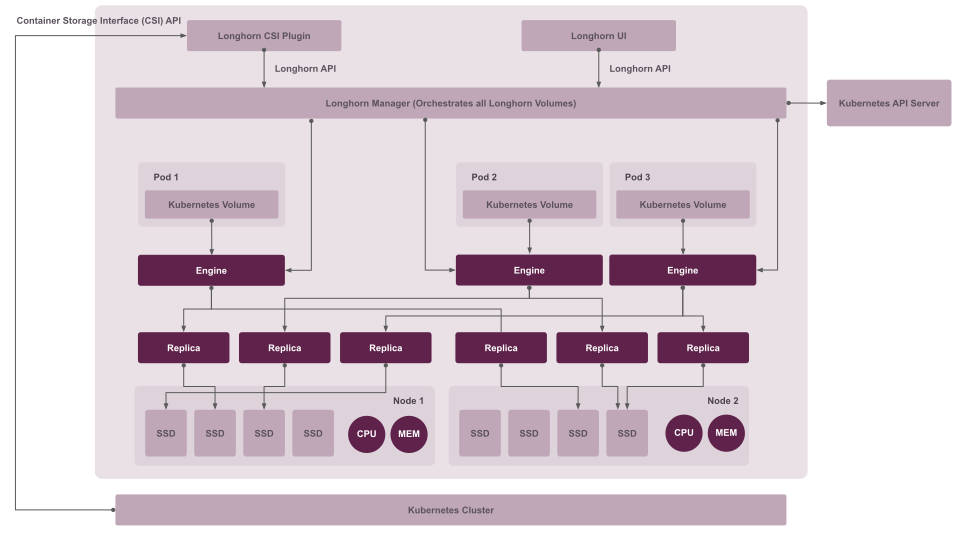
组件
Core Longhorn Components
- Longhorn Manager (longhorn-manager-*)
1
2
3
4
5
6
|
# Purpose: Main control plane component
- Manages the Longhorn storage system
- Coordinates volume operations (create, delete, attach, detach)
- Handles volume replication and scheduling
- Maintains volume health and status
- Runs on each node (DaemonSet)
|
- Longhorn UI (longhorn-ui-*)
1
2
3
4
5
|
# Purpose: Web dashboard for management
- Provides web interface for Longhorn
- Visualize volumes, nodes, and backups
- Manage snapshots and backups
- Monitor system health
|
- Longhorn CSI Plugin (longhorn-csi-plugin-*)
1
2
3
4
5
|
# Purpose: Container Storage Interface driver
- Integrates Longhorn with Kubernetes storage
- Handles volume provisioning and attachment
- Implements CSI specification
- Runs on each node (DaemonSet)
|
- Engine Image (engine-image-ei-*)
1
2
3
4
5
|
# Purpose: Volume data engine
- Actual storage engine that manages data
- Handles I/O operations for volumes
- Implements replication and rebuilding
- Multiple versions for compatibility
|
- Instance Manager (instance-manager-*)
1
2
3
4
5
|
# Purpose: Manages volume instances
- Controls engine and replica processes
- Handles volume instance lifecycle
- Two types: engine-manager and replica-manager
- One per node
|
CSI Driver Components
- CSI Attacher (csi-attacher-*)
1
2
3
4
|
# Purpose: Attaches/detaches volumes to nodes
- Implements CSI `ControllerPublishVolume`
- Handles volume attachment requests
- Multiple replicas for high availability
|
- CSI Provisioner (csi-provisioner-*)
1
2
3
4
|
# Purpose: Creates/deletes persistent volumes
- Implements CSI `CreateVolume`/`DeleteVolume`
- Dynamically provisions PVs from PVCs
- Manages storage class operations
|
- CSI Resizer (csi-resizer-*)
1
2
3
4
|
# Purpose: Resizes volumes
- Implements CSI `ControllerExpandVolume`
- Allows online volume expansion
- Handles PVC resize requests
|
- CSI Snapshotter (csi-snapshotter-*)
1
2
3
4
|
# Purpose: Manages volume snapshots
- Implements CSI volume snapshot functionality
- Creates/restores volume snapshots
- Integrates with Kubernetes VolumeSnapshot API
|
Supporting Components
- Longhorn Driver Deployer (longhorn-driver-deployer-*)
1
2
3
4
|
# Purpose: Deploys CSI driver
- Installs and updates CSI driver components
- Manages CSI driver lifecycle
- Runs as a single deployment
|
- NFS Client Provisioner (nfs-client-provisioner-*)
1
2
3
4
5
|
# Purpose: Enables RWX (ReadWriteMany) volumes
- Provides NFS sharing for Longhorn volumes
- Allows multiple pods to mount same volume simultaneously
- Essential for RWX access mode
# Note: This is for Longhorn volumes with `share: true`
|
Data Flow
数据流过程
- Control Plane: Longhorn Manager (orchestration)
- Data Plane: Engine Image + Instance Manager (I/O operations)
- K8s Integration: CSI Plugin + CSI components
- Management: Longhorn UI (monitoring/management)
- Multi-Attach: NFS Provisioner (RWX volumes)
总结列表
| Component |
Purpose |
Critical? |
Replicas |
| Longhorn Manager |
Storage orchestration |
✅ Yes |
1 per node |
| Longhorn UI |
Web management interface |
⚠️ Important |
2 |
| CSI Plugin |
Kubernetes integration |
✅ Yes |
1 per node |
| Engine Image |
Data engine |
✅ Yes |
Version-based |
| Instance Manager |
Volume instance control |
✅ Yes |
1 per node |
| CSI Attacher |
Volume attachment |
✅ Yes |
3 |
| CSI Provisioner |
Volume provisioning |
✅ Yes |
3 |
| CSI Resizer |
Volume expansion |
⚠️ Important |
3 |
| CSI Snapshotter |
Snapshots |
⚠️ Important |
3 |
| Driver Deployer |
CSI deployment |
✅ Yes |
1 |
| NFS Provisioner |
RWX volumes |
✅ For RWX |
1 |
实现细节
关系图
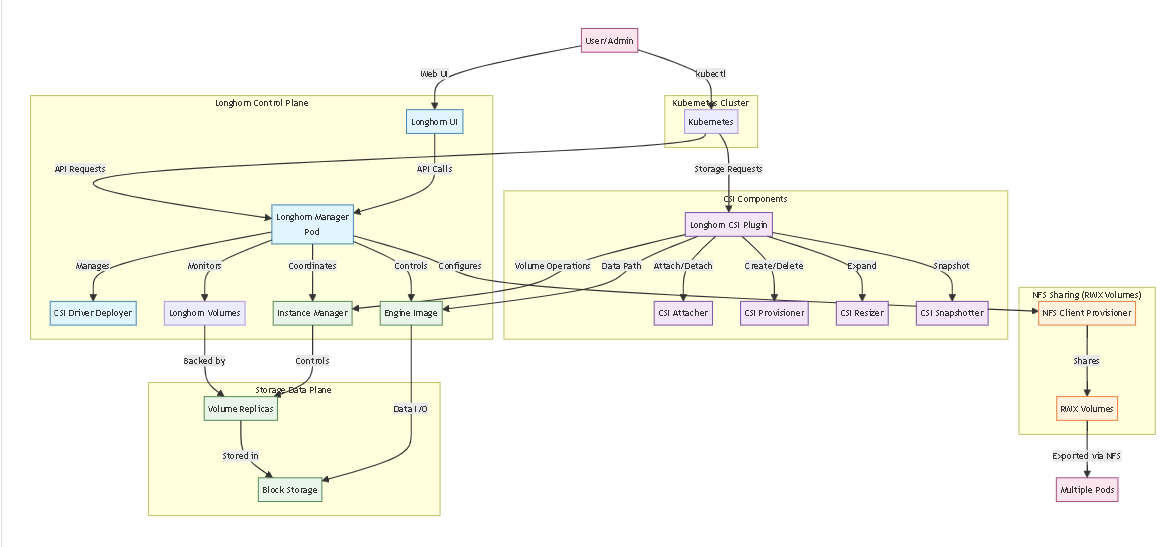
Control Plane (Blue)
- Longhorn Manager: Brain of the system - manages all operations
- Longhorn UI: Web dashboard for visualization and management
- CSI Driver Deployer: Deploys and updates CSI components
CSI Integration (Purple)
- CSI Attacher: Handles volume attachment to nodes
- CSI Provisioner: Creates/deletes PersistentVolumes
- CSI Resizer: Expands volumes on-demand
- CSI Snapshotter: Manages volume snapshots
- Longhorn CSI Plugin: Main integration point with Kubernetes
Storage Data Plane (Green)
- Instance Manager: Manages volume lifecycle on each node
- Engine Image: Handles actual data I/O operations
- Volume Replicas: Data copies distributed across nodes
- Block Storage: Underlying storage devices
- NFS Sharing (Orange)
- NFS Client Provisioner: Enables ReadWriteMany (RWX) access
- Shared Volumes: Volumes accessible by multiple pods simultaneously
Data Flow
- User/Admin interacts via UI or kubectl
- Longhorn Manager coordinates all operations
- CSI components integrate with Kubernetes storage
- Instance Managers and Engine Images handle data operations
- NFS Provisioner enables multi-pod access for RWX volumes
写数据的过程:
flowchart TD
    App[Application Pod] -->|Writes data| PVC[PersistentVolumeClaim]
    PVC -->|Storage request| LonghornVol[Longhorn Volume]

    subgraph "Longhorn Data Plane (Green Components)"
        LonghornVol -->|I/O routing| Engine[Engine Image Pod]
        Engine -->|Data distribution| Replica1[Replica 1]
        Engine -->|Data distribution| Replica2[Replica 2]
        Engine -->|Data distribution| Replica3[Replica 3]

        Replica1 -->|Writes to| Storage1[/var/lib/longhorn/]
        Replica2 -->|Writes to| Storage2[/var/lib/longhorn/]
        Replica3 -->|Writes to| Storage3[/var/lib/longhorn/]
    end

    Storage1 -->|Physical disk| Disk1[Node 1 Disk]
    Storage2 -->|Physical disk| Disk2[Node 2 Disk]
    Storage3 -->|Physical disk| Disk3[Node 3 Disk]
数据默认存储在:
交互过程:
sequenceDiagram
    participant User as User/App
    participant K8s as Kubernetes API
    participant CSI as CSI Driver
    participant LH_M as Longhorn Manager
    participant LH_E as Engine Image
    participant LH_R as Replicas

    User->>K8s: kubectl create -f pvc.yaml
    K8s->>CSI: ProvisionVolume request
    CSI->>LH_M: Create Longhorn Volume
    LH_M->>LH_E: Deploy Engine Instance
    LH_E->>LH_R: Create Replicas (3x)
    LH_R->>LH_E: Replica ready status
    LH_E->>LH_M: Volume ready
    LH_M->>CSI: Volume created success
    CSI->>K8s: PV created and bound
    K8s->>User: PVC Bound status
写入
1
2
|
# Longhorn Architecture (Distributed)
Longhorn Manager (Orchestration) + Longhorn Engine (Per-Volume) + Instance Manager (Per-Node)
|
其他操作
快照和读写流程
快照
- 最新的数据从 live data读取
- 但是live data 的某个历史点可能被覆盖了
- 内存中保持了快照的index,根据 index 可以找到最近的历史快照
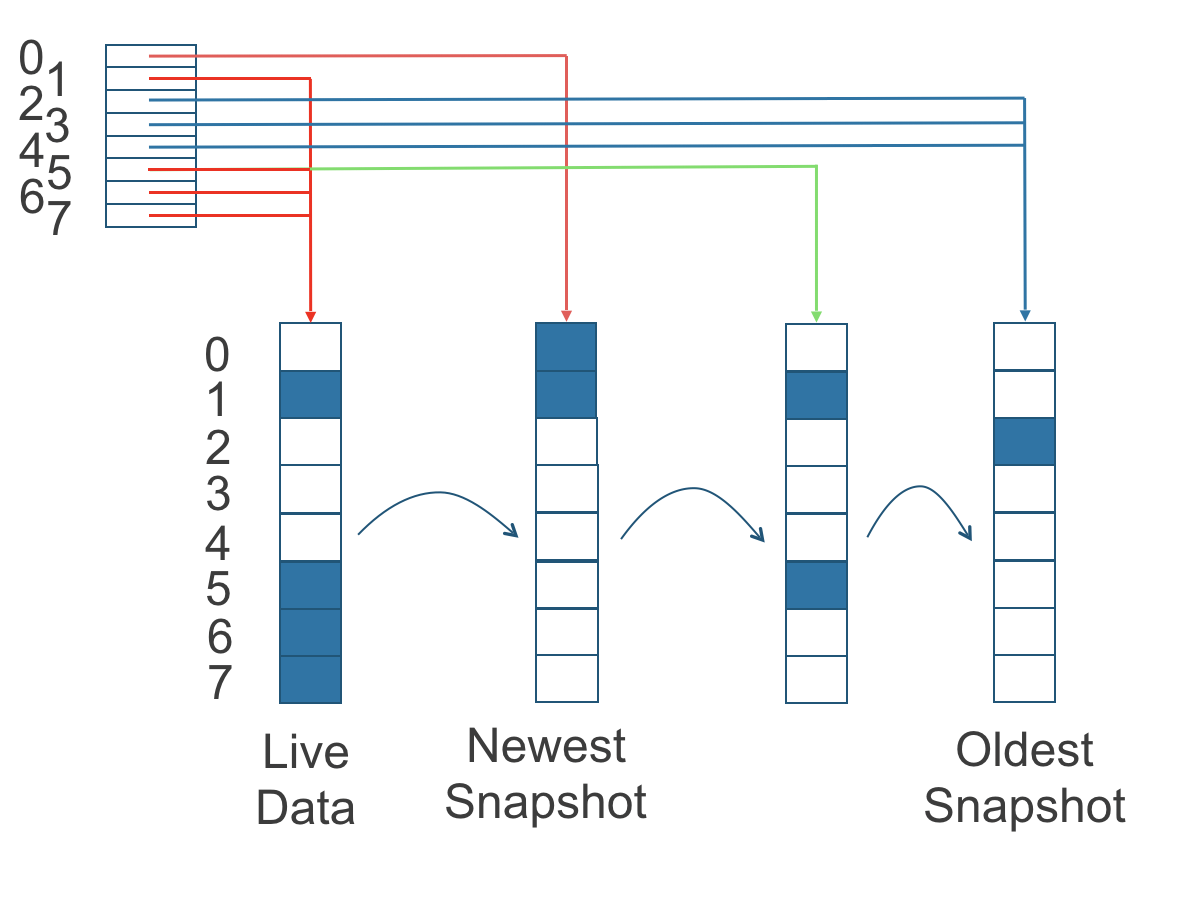
Step-by-Step Location Resolution:
- Pod requests I/O → Kubernetes routes to Longhorn CSI driver
- CSI driver queries Longhorn Manager for volume location
- Longhorn Manager checks Kubernetes for the volume’s Engine pod
- Engine pod contains the complete replica map and read index
- Engine directs I/O to the appropriate replicas
Complete Flow: CSI Driver → Longhorn Manager → Engine
sequenceDiagram
    participant CSI as CSI Driver
    participant KM as Kubernetes API
    participant LM as Longhorn Manager
    participant EP as Engine Pod
    participant CR as Custom Resources

    CSI->>LM: HTTP API call to longhorn-backend:9500
    LM->>KM: Query Volume CRD
    KM->>LM: Return volume spec/status
    LM->>KM: Query Engine Pod location
    KM->>LM: Return Engine Pod details
    LM->>CSI: Return volume location (Engine Pod info)
    CSI->>EP: Direct I/O requests to Engine Pod
Scaling Summary
| Component |
Scaling Type |
Pod Count Formula |
Fixed or Dynamic |
| Longhorn Manager |
DaemonSet |
number_of_nodes |
✅ Fixed |
| Instance Manager |
DaemonSet |
number_of_nodes |
✅ Fixed |
| Longhorn Engine |
Per-Volume |
number_of_active_volumes |
🔄 Dynamic |
pvc 绑定的过程
sequenceDiagram
    participant User as User/Admin
    participant K8s as Kubernetes API
    participant CSI as CSI Driver
    participant LM as Longhorn Manager
    participant IM as Instance Manager
    participant Engine as Longhorn Engine

    User->>K8s: kubectl create -f pvc.yaml
    K8s->>CSI: PVC Creation Request
    CSI->>LM: API Call to Longhorn Manager
    LM->>K8s: Create Volume CRD
    LM->>IM: Deploy Engine & Replicas
    IM->>Engine: Create Engine Instance
    IM->>IM: Create Replica Instances
    Engine->>CSI: Volume Ready Notification
    CSI->>K8s: PV Created & Bound
    K8s->>User: PVC Bound
备份
The Relationship between Backups in Secondary Storage and Snapshots in Primary Storage
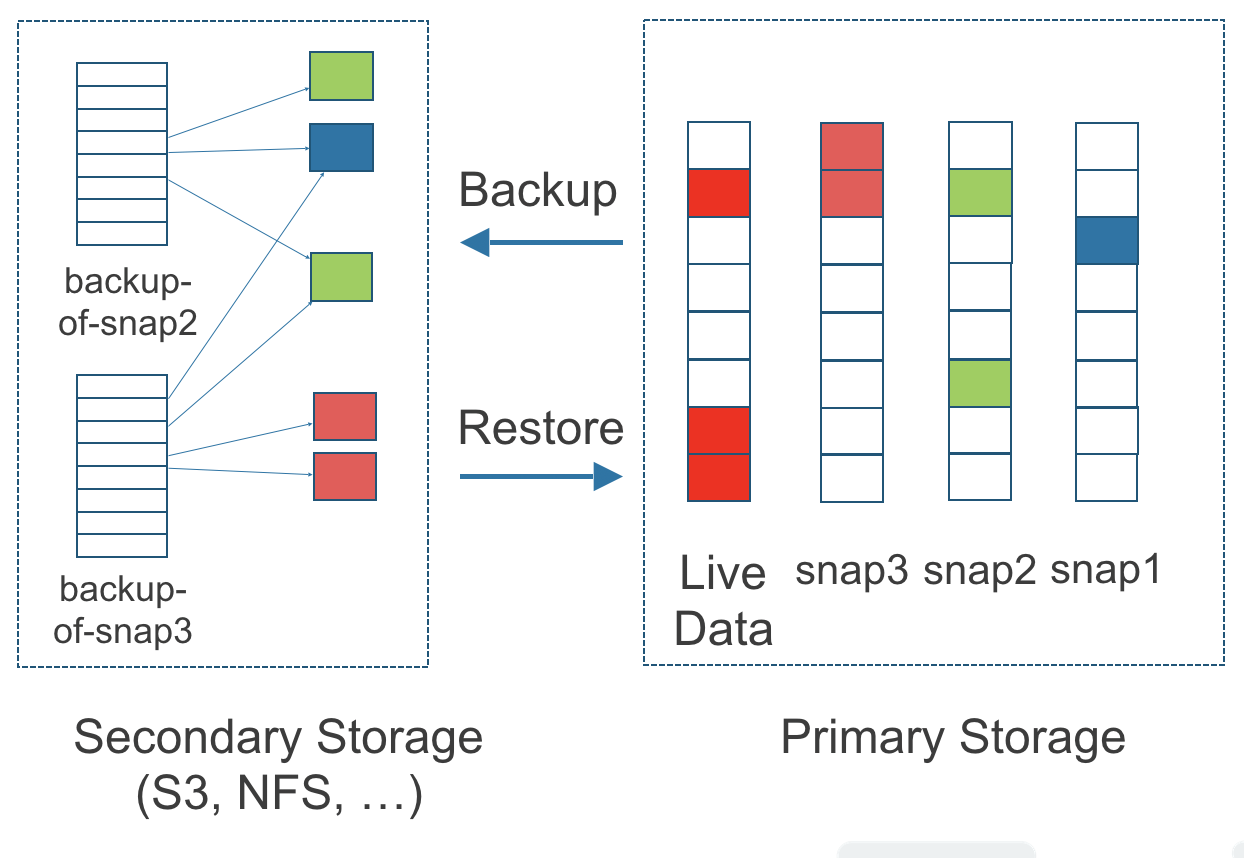
Backup Creation Process**
graph LR
    A[Live Volume] --> B[Snapshot] --> C[Backup] --> D[Backupstore]

    subgraph "Cluster"
        A --> E[Snapshot Chain]
        E --> B
    end

    subgraph "External Storage"
        D --> F[S3/NFS]
    end
可以cron 定时触发
可以增量写 外部存储
物理和逻辑关系
物理和逻辑关系
 1
 2
 3
 4
 5
 6
 7
 8
 9
10
|
Logical View (K8s/User)      Physical View (Node Filesystem)
┌─────────────────────┐      ┌─────────────────────────────────────┐
│ PVC: my-app-data    │      │ /var/lib/longhorn/replicas/         │
│                     │      │   pvc-8b23a1cd...-073f7fd3/         │
│ Longhorn Volume:    │◄────►│   ├── volume.meta                   │
│  - Size: 1GB        │      │   ├── volume-head-002.img (live)    │
│  - State: attached  │      │   ├── volume-snap-xxx.img (snapshot)│
│  - Node: node2      │      │   └── *.meta files                 │
│  - Health: healthy  │      └─────────────────────────────────────┘
└─────────────────────┘
|
volumes.longhorn.io 这个 CR 信息:
 1
 2
 3
 4
 5
 6
 7
 8
 9
10
11
12
13
14
15
|
kubectl get volumes.longhorn.io -n longhorn-system
NAME                                       DATA ENGINE   STATE      ROBUSTNESS   SCHEDULED   SIZE          NODE    AGE
pvc-31c91a1a-b871-4355-8bb6-1daf0e47a3f2   v1            attached   healthy                  6442450944    node2   40h
pvc-351abcd9-5a4e-4056-adbe-39594cb50b98   v1            detached   unknown                  6442450944            40h
pvc-49f1dda7-34cb-409e-93ed-3dc521659441   v1            attached   healthy                  1073741824    node1   2d23h
pvc-4fb09e73-b790-4350-88e6-f2aa1a3f256d   v1            detached   unknown                  1073741824            40h
pvc-5117dd9b-0dee-4f72-a2e7-38808c499608   v1            attached   healthy                  1073741824    node1   40h
pvc-78aeef5f-6680-44c4-b199-63b92b7fdafe   v1            detached   unknown                  21474836480           5d20h
pvc-8089565a-eb28-42d0-9acf-d827886fe546   v1            detached   unknown                  1073741824            40h
pvc-88f9aa51-5b17-4eff-8c91-b1d56087b78d   v1            attached   healthy                  1073741824    node2   40h
pvc-8b23a1cd-f716-4c51-9ae8-e3dee66e9652   v1            attached   healthy                  1073741824    node2   2d23h
pvc-a24a9aa5-b9b3-4861-a5ca-cd767e2edd4c   v1            detached   unknown                  21474836480           5d20h
pvc-c0371cd3-a6c3-471c-bda5-67fbdba3c9c7   v1            detached   unknown                  1073741824            40h
pvc-d036fa3c-7deb-4d4f-b328-e4108ce4c2ab   v1            attached   healthy                  1073741824    node1   2d23h
pvc-d137d078-59b7-4da3-b003-77ef95309d1c   v1            attached   healthy                  6442450944    node1   40h
|
longhorn 相关的所有 crd
 1
 2
 3
 4
 5
 6
 7
 8
 9
10
11
12
13
14
15
16
17
18
19
20
21
22
23
|
kubectl get crd | grep longhorn
backingimagedatasources.longhorn.io                           2025-12-18T02:27:33Z
backingimagemanagers.longhorn.io                              2025-12-18T02:27:33Z
backingimages.longhorn.io                                     2025-12-18T02:27:33Z
backupbackingimages.longhorn.io                               2025-12-18T02:27:33Z
backups.longhorn.io                                           2025-12-18T02:27:33Z
backuptargets.longhorn.io                                     2025-12-18T02:27:33Z
backupvolumes.longhorn.io                                     2025-12-18T02:27:34Z
engineimages.longhorn.io                                      2025-12-18T02:27:34Z
engines.longhorn.io                                           2025-12-18T02:27:34Z
instancemanagers.longhorn.io                                  2025-12-18T02:27:34Z
nodes.longhorn.io                                             2025-12-18T02:27:34Z
orphans.longhorn.io                                           2025-12-18T02:27:34Z
recurringjobs.longhorn.io                                     2025-12-18T02:27:34Z
replicas.longhorn.io                                          2025-12-18T02:27:34Z
settings.longhorn.io                                          2025-12-18T02:27:34Z
sharemanagers.longhorn.io                                     2025-12-18T02:27:34Z
snapshots.longhorn.io                                         2025-12-18T02:27:34Z
supportbundles.longhorn.io                                    2025-12-18T02:27:34Z
systembackups.longhorn.io                                     2025-12-18T02:27:34Z
systemrestores.longhorn.io                                    2025-12-18T02:27:34Z
volumeattachments.longhorn.io                                 2025-12-18T02:27:34Z
volumes.longhorn.io                                           2025-12-18T02:27:35Z
|
How PV, PVC, and StorageClass Work Together
graph LR
    A[User creates PVC] --> B[StorageClass]
    B --> C[CSI Driver]
    C --> D[Storage Provider<br/>Longhorn/NFS/EBS]
    D --> E[PV Created]
    E --> F[PVC Bound]
    F --> G[Pod uses Volume]
Advanced Longhorn Features
Incremental Snapshots with Chain Management
- Advanced Benefit: Space-efficient snapshots that only store block differences, enabling point-in-time recovery without massive storage overhead.
 1
 2
 3
 4
 5
 6
 7
 8
 9
10
11
12
13
|
# Example: Automated snapshot chain with retention policy
apiVersion: longhorn.io/v1beta2
kind: Volume
metadata:
  name: mysql-data
spec:
  numberOfReplicas: 3
  snapshotPolicy:
    # Automated snapshots every 6 hours, keep 5 latest
    snapshotInterval: 6h
    snapshotRetention: 5
  # Incremental snapshots - only store changed blocks
  dataLocality: best-effort
|
Cross-Cluster Disaster Recovery
- Use Case: Primary cluster in AWS us-east-1 fails → Restore volumes in us-west-2 from S3 backups within minutes.
 1
 2
 3
 4
 5
 6
 7
 8
 9
10
11
12
13
14
|
# Setup backup to S3 with cross-cluster restore capability
apiVersion: longhorn.io/v1beta2
kind: Backup
metadata:
  name: dr-backup-policy
spec:
  syncInterval: 1h
  backupTarget:
    type: s3
    endpoint: s3.amazonaws.com
    bucket: longhorn-backups
    region: us-west-2
  # Enable encryption for off-site backups
  encryption: true
|
Quality of Service (QoS) Controls
- Enterprise Feature: Ensure predictable performance for production databases while allowing burst capacity for less critical workloads.
 1
 2
 3
 4
 5
 6
 7
 8
 9
10
11
12
|
# Apply performance limits to prevent noisy neighbors
apiVersion: longhorn.io/v1beta2
kind: Setting
metadata:
  name: volume-qos
spec:
  # IOPS limits per volume
  iopsLimit: 1000
  # Throughput limits
  throughputLimit: 100Mi
  # Reserve resources for critical workloads
  guaranteedIops: 500
|
Volume Cloning and Templating
- DevOps Benefit: Create 100+ development environments from production snapshots in seconds, each consuming storage incrementally.
 1
 2
 3
 4
 5
 6
 7
 8
 9
10
11
12
|
# Create instant clones for development/testing
apiVersion: longhorn.io/v1beta2
kind: Volume
metadata:
  name: prod-db-clone
spec:
  fromBackup:
    backup: s3://longhorn-backups/prod-db-latest
  # Clone without consuming full storage immediately
  thinProvision: true
  # Customize clone parameters
  replicaAutoBalance: best-effort
|
Advanced Replication Strategies
- HA Pattern: Survives entire availability zone failures while maintaining data locality optimizations.
 1
 2
 3
 4
 5
 6
 7
 8
 9
10
11
12
13
14
|
# Multi-zone replication for high availability
apiVersion: longhorn.io/v1beta2
kind: Volume
metadata:
  name: cross-az-volume
spec:
  numberOfReplicas: 3
  replicaAutoBalance: true
  # Spread replicas across failure domains
  nodeSelector:
    - key: topology.kubernetes.io/zone
      operator: In
      values: [us-east-1a, us-east-1b, us-east-1c]
  dataLocality: strict-local
|
CSI Snapshots Integration with Kubernetes
 1
 2
 3
 4
 5
 6
 7
 8
 9
10
11
12
13
14
15
16
17
18
19
20
21
22
23
24
25
|
# Native Kubernetes snapshot API integration
apiVersion: snapshot.storage.k8s.io/v1
kind: VolumeSnapshot
metadata:
  name: app-daily-snapshot
spec:
  volumeSnapshotClassName: longhorn-snapshot-class
  source:
    persistentVolumeClaimName: app-data-pvc
---
# Schedule with Kubernetes CronJob
apiVersion: batch/v1
kind: CronJob
metadata:
  name: snapshot-job
spec:
  schedule: "0 2 * * *"  # Daily at 2 AM
  jobTemplate:
    spec:
      template:
        spec:
          containers:
          - name: snapshotter
            image: longhornio/longhorn-manager:v1.10.1
            command: ["lhctl", "snapshot", "create", "app-data"]
|
Performance Monitoring and Analytics
 1
 2
 3
 4
 5
 6
 7
 8
 9
10
11
12
13
14
15
16
17
18
|
# Advanced metrics collection
apiVersion: monitoring.coreos.com/v1
kind: ServiceMonitor
metadata:
  name: longhorn-metrics
  labels:
    app: longhorn
spec:
  selector:
    matchLabels:
      app: longhorn-manager
  endpoints:
  - port: manager
    path: /metrics
    interval: 30s
    # Custom metrics for performance analysis
    params:
      metrics: [iops, latency, throughput, replica_health]
|
Encryption at Rest with Key Rotation
- Security: Enterprise-grade encryption with compliance-friendly key rotation policies.
 1
 2
 3
 4
 5
 6
 7
 8
 9
10
11
12
13
14
|
# Volume encryption with automatic key management
apiVersion: longhorn.io/v1beta2
kind: Volume
metadata:
  name: encrypted-volume
spec:
  encryption: true
  # Integration with external KMS
  kmsProvider:
    name: vault
    endpoint: https://vault.example.com:8200
    keyName: longhorn-encryption-key
  # Automatic key rotation every 90 days
  keyRotation: 90d
|
参考