StreamOperator
StreamOperator 的相关类图
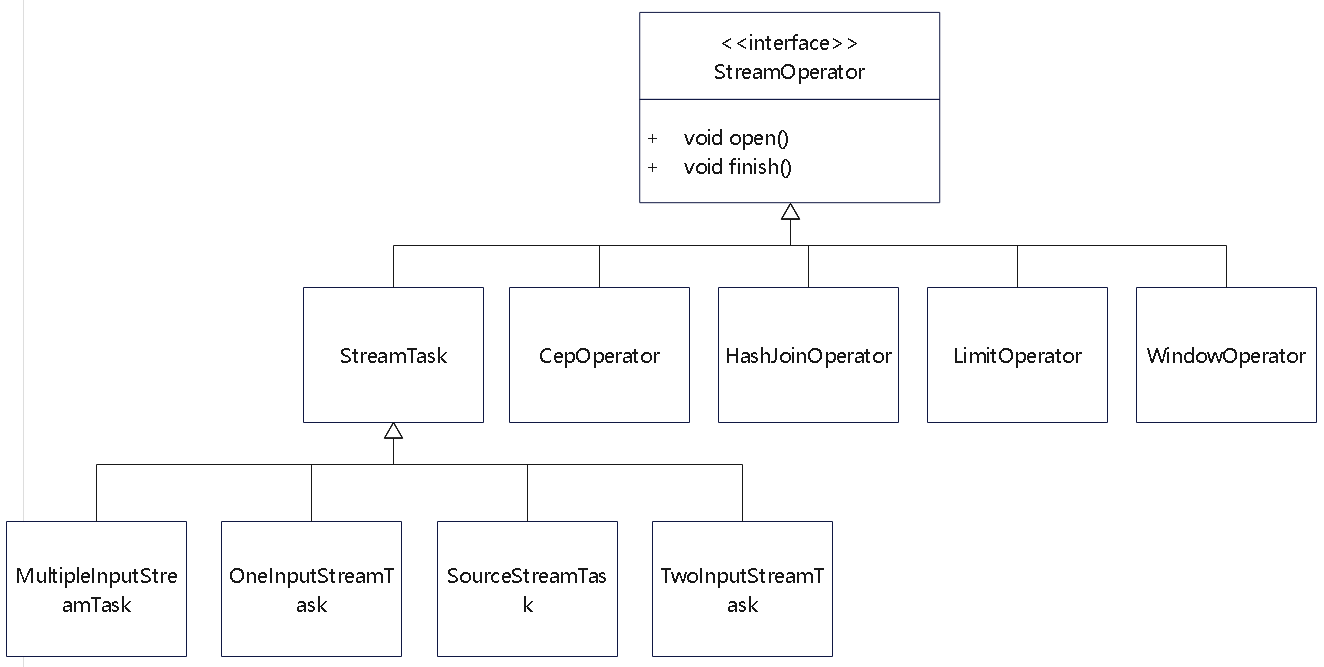
AbstractStreamOperator
 1
 2
 3
 4
 5
 6
 7
 8
 9
10
11
12
13
14
15
16
17
18
19
20
21
22
23
24
25
26
27
28
29
30
31
32
33
34
35
36
37
38
39
40
41
42
43
44
45
46
47
48
49
50
51
|
// ----------- configuration properties -------------

    // A sane default for most operators
    protected ChainingStrategy chainingStrategy = ChainingStrategy.HEAD;

    // ---------------- runtime fields ------------------

    /** The task that contains this operator (and other operators in the same chain). */
    private transient StreamTask<?, ?> container;

    protected transient StreamConfig config;

    protected transient Output<StreamRecord<OUT>> output;

    private transient IndexedCombinedWatermarkStatus combinedWatermark;

    /** The runtime context for UDFs. */
    private transient StreamingRuntimeContext runtimeContext;

    // ---------------- key/value state ------------------

    /**
     * {@code KeySelector} for extracting a key from an element being processed. This is used to
     * scope keyed state to a key. This is null if the operator is not a keyed operator.
     *
     * <p>This is for elements from the first input.
     */
    private transient KeySelector<?, ?> stateKeySelector1;

    /**
     * {@code KeySelector} for extracting a key from an element being processed. This is used to
     * scope keyed state to a key. This is null if the operator is not a keyed operator.
     *
     * <p>This is for elements from the second input.
     */
    private transient KeySelector<?, ?> stateKeySelector2;

    private transient StreamOperatorStateHandler stateHandler;

    private transient InternalTimeServiceManager<?> timeServiceManager;

    // --------------- Metrics ---------------------------

    /** Metric group for the operator. */
    protected transient InternalOperatorMetricGroup metrics;

    protected transient LatencyStats latencyStats;

    // ---------------- time handler ------------------

    protected transient ProcessingTimeService processingTimeService;
|
其中
- ChainingStrategy:ALWAYS、NEVER或HEAD类型
- StreamTask container:表示当前Operator所属的StreamTask,最终会通过StreamTask中的invoke()方法执行当前StreamTask中的所有Operator
- Output<StreamRecord> output:定义了当前StreamOperator的输出操作,执行完该算子的所有转换操作后,会通过Output组件将数据推送到下游算子继续执行
- KeySelector stateKeySelector1:只有DataStream经过keyBy()转换操作生成KeyedStream后,才会设定该算子的stateKeySelector1变量信息
- OperatorStateBackend operatorStateBackend:和keyedStateBackend相似,主要提供OperatorState对应的状态后端存储,默认OperatorStateBackend只有DefaultOperatorStateBackend实现
算子实现
AbstractUdfStreamOperator
- 比如StreamFlatMap 就继承了这个类
- 可以回调到自定义的函数,自定义函数初始化等
- 设置上下文,时间之类的
- 触发快照功能
 1
 2
 3
 4
 5
 6
 7
 8
 9
10
11
12
13
14
15
16
17
18
19
20
|
public class StreamFlatMap<IN, OUT> extends AbstractUdfStreamOperator<OUT, FlatMapFunction<IN, OUT>>
        implements OneInputStreamOperator<IN, OUT> {

    private transient TimestampedCollector<OUT> collector;

    public StreamFlatMap(FlatMapFunction<IN, OUT> flatMapper) {
        super(flatMapper);
        chainingStrategy = ChainingStrategy.ALWAYS;
    }

    public void open() throws Exception {
        super.open();
        collector = new TimestampedCollector<>(output);
    }

    public void processElement(StreamRecord<IN> element) throws Exception {
        collector.setTimestamp(element);
        userFunction.flatMap(element.getValue(), collector);
    }
}
|
一元和二元输入
- OneInputStreamOperator,可以输入一个算子
- TwoInputStreamOperator,可以输入两个算子
- 通过不断叠加 二元输入,就可以实现多个算子输入
StreamFilter 就实现了一元算子,并且尽可能跟下游算子合并在一起
 1
 2
 3
 4
 5
 6
 7
 8
 9
10
11
12
|
public class StreamFilter<IN> extends AbstractUdfStreamOperator<IN, FilterFunction<IN>>
        implements OneInputStreamOperator<IN, IN> {
    public StreamFilter(FilterFunction<IN> filterFunction) {
        super(filterFunction);
        chainingStrategy = ChainingStrategy.ALWAYS;
    }
    public void processElement(StreamRecord<IN> element) throws Exception {
        if (userFunction.filter(element.getValue())) {
            output.collect(element);
        }
    }
}
|
HashJoinOperator 的实现,类似单机的 hash join 实现
1
2
3
4
5
6
7
8
9
|
    public void processElement1(StreamRecord<RowData> element) throws Exception {
        this.table.putBuildRow((RowData)element.getValue());
    }

    public void processElement2(StreamRecord<RowData> element) throws Exception {
        if (this.table.tryProbe((RowData)element.getValue())) {
            this.joinWithNextKey();
        }
    }
|
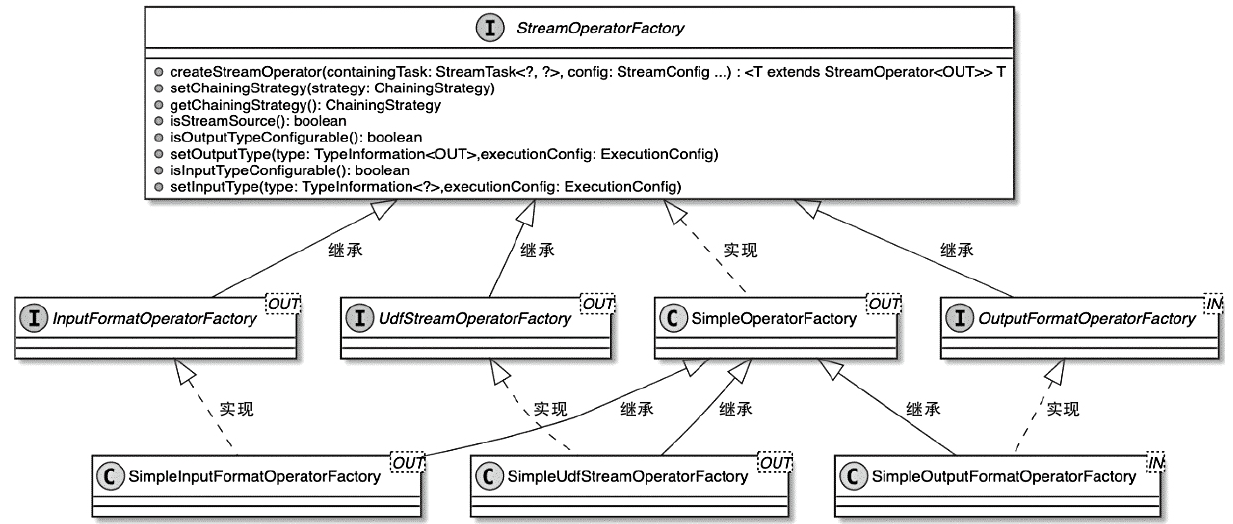
Function
Function
- Flink实现的Function接口专门用于处理接入的数据元素
- StreamOperator负责对内部Function的调用和执行
- 当StreamOperator被Task调用和执行时,StreamOperator会将接入的数据元素传递给内部Function进行处理
- 然后将Function处理后的结果推送给下游的算子继续处理
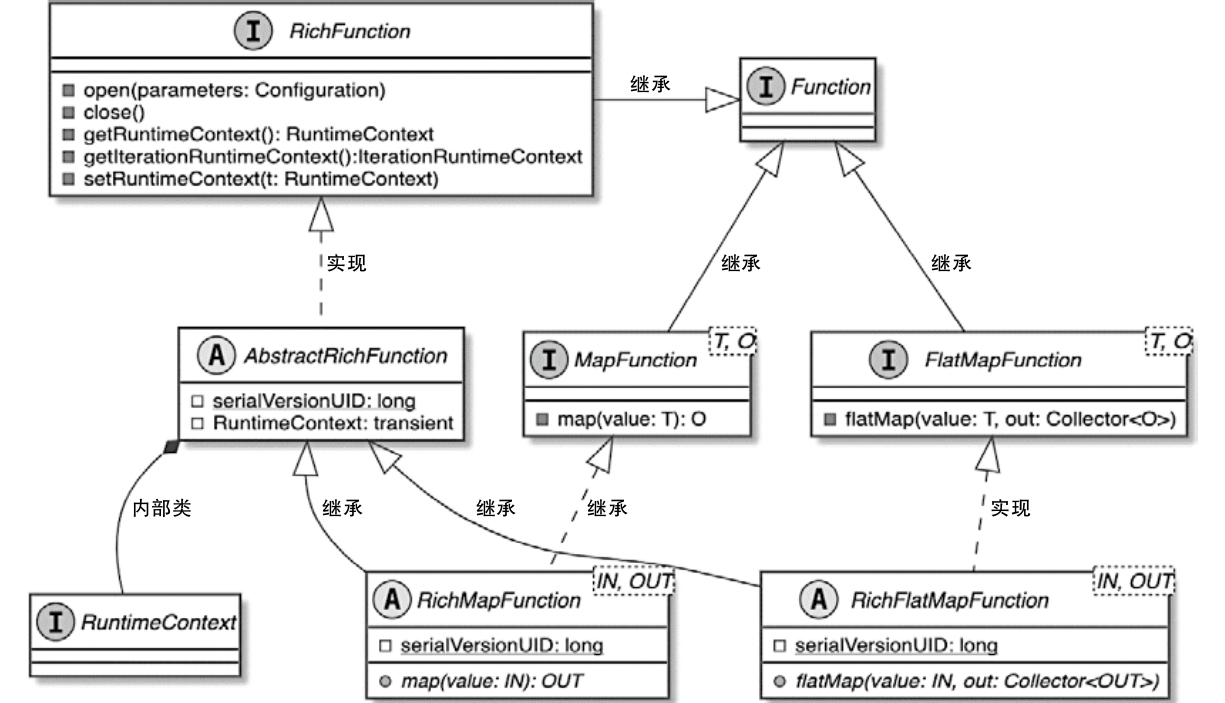
RichFunction
- 增加了状态处理机制
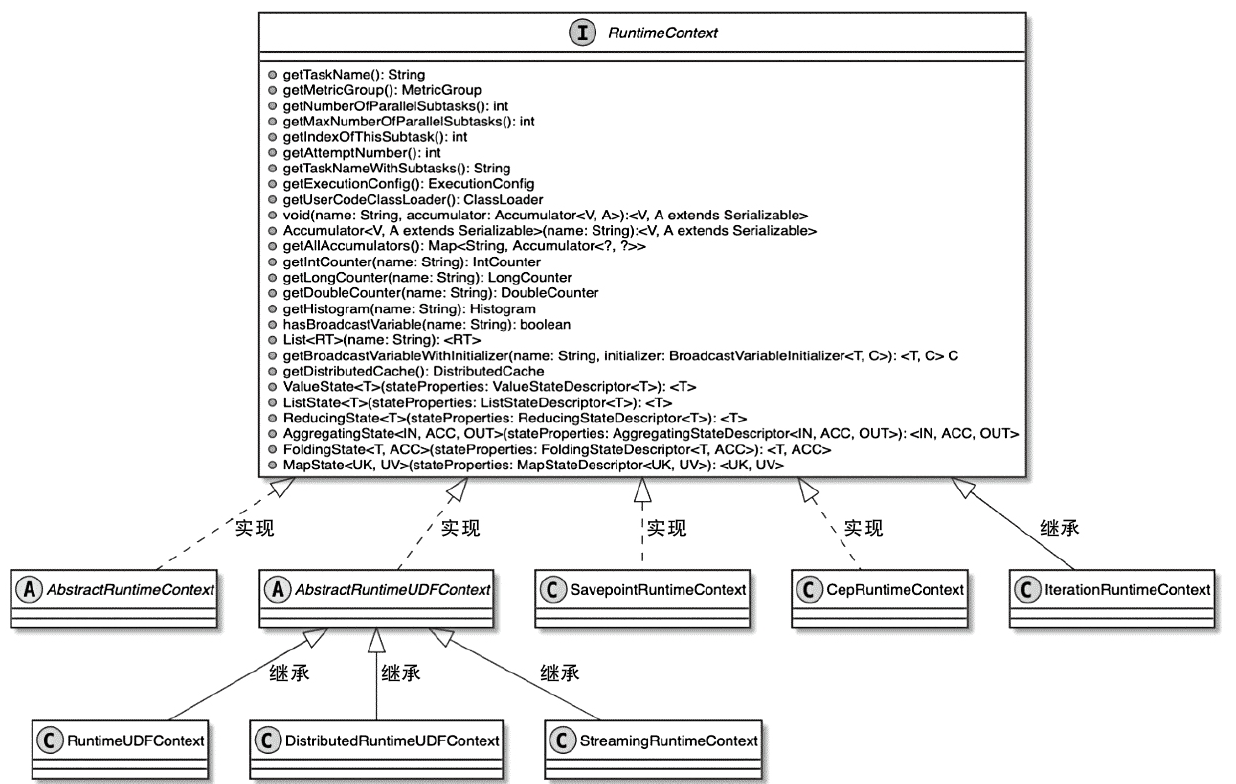
- 算子通过获取 RuntimeContext,就可以操作 Accumulator、BroadcastVariable和DistributedCache 等变量
- Flink中提供了不同的RuntimeContext实现类,以满足不同Operator对运行时上下文信息的获取
RichMapFunction 的完整例子
 1
 2
 3
 4
 5
 6
 7
 8
 9
10
11
12
13
14
15
16
17
18
19
20
21
22
23
24
25
26
27
28
29
30
31
32
33
34
|
import org.apache.flink.api.common.functions.RichMapFunction;
import org.apache.flink.configuration.Configuration;
import org.apache.flink.streaming.api.datastream.DataStream;
import org.apache.flink.streaming.api.environment.StreamExecutionEnvironment;

public class RichMapFunctionExample {
    public static void main(String[] args) throws Exception {
        StreamExecutionEnvironment env = StreamExecutionEnvironment.getExecutionEnvironment();
        DataStream<Integer> inputStream = env.fromElements(1, 2, 3, 4, 5);
        DataStream<String> resultStream = inputStream.map(new MyRichMapFunction());
        resultStream.print();
        env.execute("RichMapFunction Example");
    }

    public static class MyRichMapFunction extends RichMapFunction<Integer, String> {
        private int subtaskIndex;

        @Override
        public void open(Configuration parameters) {
            subtaskIndex = getRuntimeContext().getIndexOfThisSubtask();
            System.out.println("Task " + subtaskIndex + " is starting.");
        }

        @Override
        public String map(Integer value) {
            return "Task " + subtaskIndex + " processed: " + (value * 2);
        }

        @Override
        public void close() {
            System.out.println("Task " + subtaskIndex + " is shutting down.");
        }
    }
}
|
SourceFunction 和 SinkFunction
一个Source 的例子
 1
 2
 3
 4
 5
 6
 7
 8
 9
10
11
12
13
14
15
16
17
18
19
20
21
22
|
public class SimpleSource implements SourceFunction<Tuple2<String, Integer>> {
    private int offset = 0;

    private boolean isRunning = true;

    @Override
    public void run(SourceContext<Tuple2<String, Integer>> ctx) throws Exception {
        while (isRunning) {
            Thread.sleep(2000);
            ctx.collect(new Tuple2<>("" + offset, offset));
            offset++;
            if (offset == 100) {
                isRunning = false;
            }
        }
    }

    @Override
    public void cancel() {
        isRunning = false;
    }
}
|
SourceFunction 类图
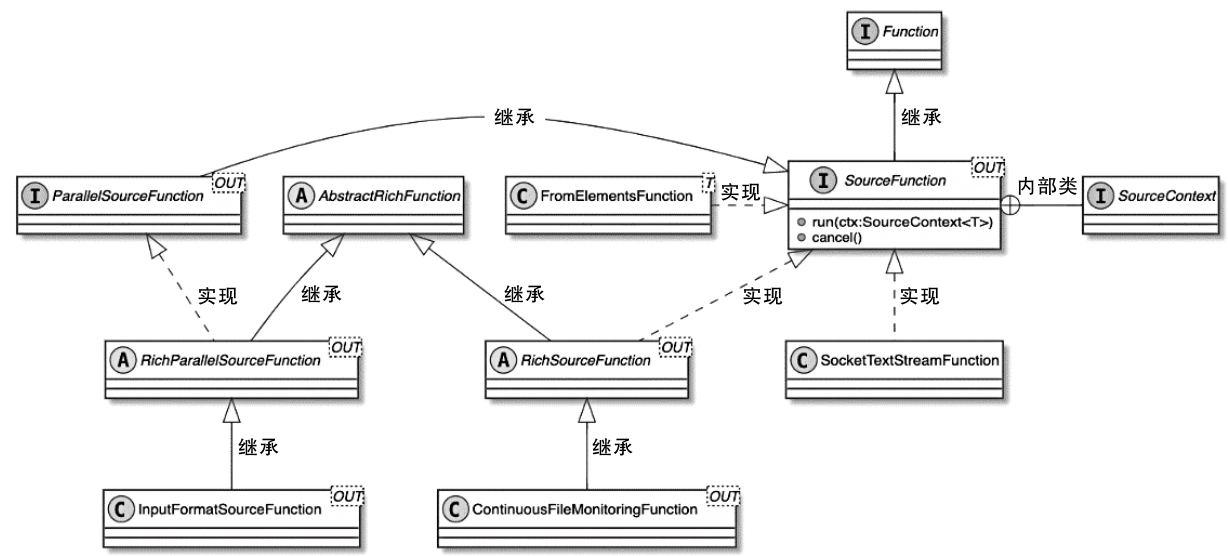
SourceContex
- SourceContext类型与TimeCharacteristic的对应关系
- 用户设定不同的TimeCharacteristic,就会创建不同类型的SourceContext
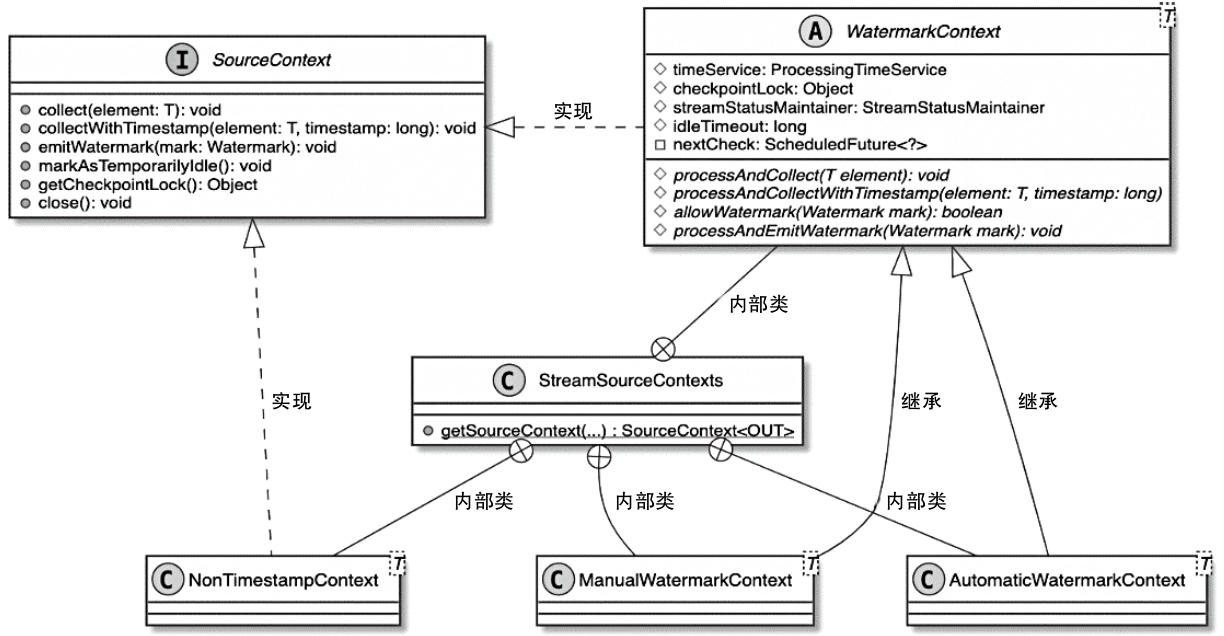
SourceContext类型与TimeCharacteristic的对应关系
| TimeCharacteristic |
SourceContext |
| IngestionTime(摄入时间) |
AutomaticWatermarkContext |
| ProcessingTime(处理时间) |
NonTimestampContext |
| EventTime(事件事件) |
ManualWatermarkContext |
执行过程
1
|
SourceStreamTask#run(继承Thread) --> StreamSource#run() --> SimpleSource
|
StreamSource.run() 主要逻辑
- 从OperatorConfig中获取TimeCharacteristic,并从Task的环境信息Environment中获取Configuration配置信息
- 创建LatencyMarksEmitter实例,主要用于在SourceFunction中输出Latency标记,也就是周期性地生成时间戳,当下游算子接收到SourceOperator发送的LatencyMark后,会使用当前的时间减去LatencyMark中的时间戳,以此确认该算子数据处理的延迟情况,最后算子会将LatencyMark监控指标以Metric的形式发送到外部的监控系统中
- 创建SourceContext,这里调用的是StreamSourceContexts.getSourceContext()方法,在该方法中根据TimeCharacteristic参数创建对应类型的SourceContext
- 将SourceContext实例应用在自定义的SourceFunction中,此时SourceFunction能够直接操作SourceContext,例如收集数据元素、输出Watermark事件等
- 调用userFunction.run(ctx)方法,调用和执行SourceFunction实例
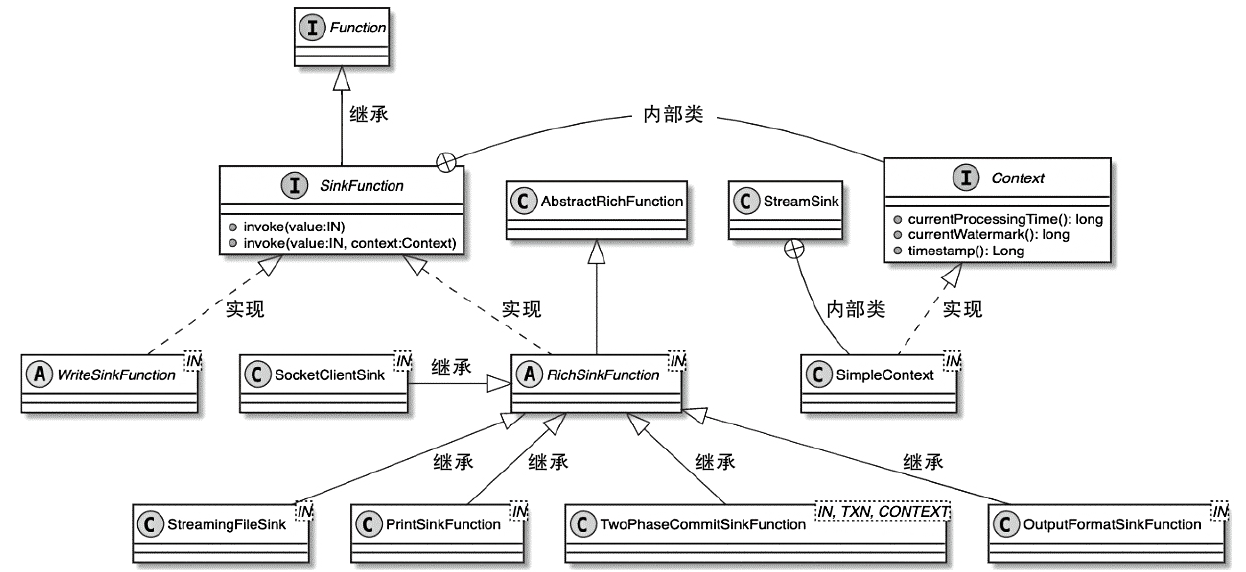
SinkFunction 类图
- 也包含了RichSinkFunction
- 支持端到端一致性的 TwoPhaseCommitSinkFunction
一个Sink 的例子
1
2
3
4
5
6
7
8
|
public class MySink implements SinkFunction<Tuple2<String, Integer>> {

    @Override
    public void invoke(Tuple2<String, Integer> value, Context context) throws Exception {
        SinkFunction.super.invoke(value, context);
        System.out.println("MySink:" + value + "\t" + context);
    }
}
|
执行过程
1
|
StreamSink#processElement() --> MySink#invoke()
|
两阶段提交的例子
 1
 2
 3
 4
 5
 6
 7
 8
 9
10
11
12
13
14
15
16
17
18
19
20
21
22
23
24
25
26
27
28
29
30
31
32
33
34
35
36
37
38
39
40
41
42
43
44
45
46
47
48
49
50
51
52
53
54
55
56
57
|
import org.apache.flink.api.common.typeutils.base.StringSerializer;
import org.apache.flink.api.common.typeutils.base.VoidSerializer;
import org.apache.flink.streaming.api.functions.sink.TwoPhaseCommitSinkFunction;

public class TwoPhaseSink extends TwoPhaseCommitSinkFunction<String, String, Void> {

    public TwoPhaseSink() {
        super(StringSerializer.INSTANCE, VoidSerializer.INSTANCE);
    }

    @Override
    protected String beginTransaction() {
        // Simulate transaction start
        String transactionId = "TX-" + System.currentTimeMillis();
        System.out.println("Starting transaction: " + transactionId);
        return transactionId;
    }

    @Override
    protected void invoke(String transaction, String value, Context context) {
        // Simulate writing data in the transaction
        System.out.println("Transaction " + transaction + " processing value: " + value);
    }

    @Override
    protected void preCommit(String transaction) {
        // Simulate pre-commit
        System.out.println("Pre-committing transaction: " + transaction);
    }

    @Override
    protected void commit(String transaction) {
        // Simulate final commit
        System.out.println("Committing transaction: " + transaction);
    }

    @Override
    protected void abort(String transaction) {
        // Simulate rollback
        System.out.println("Aborting transaction: " + transaction);
    }
}


// 调用
    public static void main(String[] args) throws Exception {
        StreamExecutionEnvironment env = StreamExecutionEnvironment.getExecutionEnvironment();
        env.enableCheckpointing(5000);  // Enable checkpointing every 5 seconds

        // Example data stream
        DataStream<String> inputStream = env.fromElements("Alice", "Bob", "Charlie", "David");

        // Add sink
        inputStream.addSink(new TwoPhaseSink());

        env.execute("TwoPhaseCommitSinkFunction Console Example");
    }
|
ProcessFunction
ProcessFunction is a low-level API in Flink that provides fine-grained control over event processing. Unlike MapFunction or FlatMapFunction, ProcessFunction allows:
- Access to timestamps and watermarks (for event-time processing).
- Emitting side outputs (for splitting streams).
- Using state and timers (for complex event-driven logic).
根据数据元素是否进行了KeyBy操作,可以将ProcessFunction分为
- KeyedProcessFunction
- ProcessFunction
ProcessFunction 例子
 1
 2
 3
 4
 5
 6
 7
 8
 9
10
11
12
13
14
15
16
17
18
19
20
21
22
23
24
25
26
27
28
29
30
31
32
33
34
35
36
|
public class ProcessFunctionExample {
    public static void main(String[] args) throws Exception {
        // Set up the execution environment
        StreamExecutionEnvironment env = StreamExecutionEnvironment.getExecutionEnvironment();
        env.enableCheckpointing(5000);  // Enable checkpointing for fault tolerance

        // Create an example data stream
        DataStream<Integer> inputStream = env
                .fromElements(10, 25, 45, 60, 75, 90)
                .assignTimestampsAndWatermarks(WatermarkStrategy
                        .<Integer>forBoundedOutOfOrderness(Duration.ofSeconds(1))
                        .withTimestampAssigner((event, timestamp) -> System.currentTimeMillis()));

        // Define a side output tag
        final OutputTag<Integer> lowValueTag = new OutputTag<Integer>("low-values") {};

        // Apply ProcessFunction
        SingleOutputStreamOperator<Integer> processedStream = inputStream.process(new ProcessFunction<Integer, Integer>() {
            @Override
            public void processElement(Integer value, Context ctx, Collector<Integer> out) {
                if (value > 50) {
                    out.collect(value);  // Send to main output
                } else {
                    ctx.output(lowValueTag, value);  // Send to side output
                }
            }
        });

        // Extract side output stream
        DataStream<Integer> lowValueStream = processedStream.getSideOutput(lowValueTag);

        processedStream.print("High Values");  // Expected: 60, 75, 90
        lowValueStream.print("Low Values");  // Expected: 10, 25, 45
        env.execute("ProcessFunction Example");
    }
}
|
KeyedProcessFunction 类图
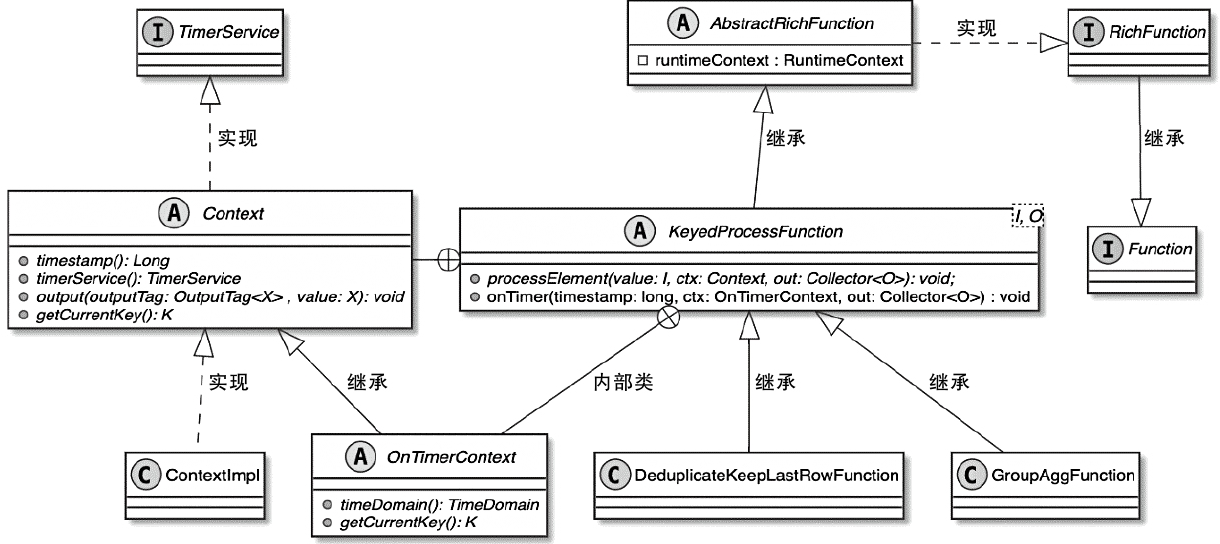
KeyedProcessFunction 的例子
 1
 2
 3
 4
 5
 6
 7
 8
 9
10
11
12
13
14
15
16
17
18
19
20
21
22
23
24
25
26
27
28
29
30
31
32
33
34
35
36
37
38
39
40
41
42
43
44
45
46
47
48
|
public class CountWithTimeoutJob {
    public static void main(String[] args) throws Exception {
        // Set up the execution environment
        StreamExecutionEnvironment env = StreamExecutionEnvironment.getExecutionEnvironment();
        env.enableCheckpointing(5000);  // Enable checkpointing for fault tolerance

        // Create an example data stream
        DataStream<String> inputStream = env.fromElements("Alice", "Bob", "Alice", "Bob", "Alice")
                .assignTimestampsAndWatermarks(WatermarkStrategy
                        .<String>forBoundedOutOfOrderness(Duration.ofSeconds(1))
                        .withTimestampAssigner((event, timestamp) -> System.currentTimeMillis()));

        // Key the stream by user
        KeyedStream<String, String> keyedStream = inputStream.keyBy((KeySelector<String, String>) value -> value);

        // Apply KeyedProcessFunction
        DataStream<String> resultStream = keyedStream.process(new CountWithTimeoutFunction());

        resultStream.print();
        env.execute("KeyedProcessFunction Example with Timeout");
    }
}

// KeyedProcessFunction to count events per key and trigger after inactivity
class CountWithTimeoutFunction extends KeyedProcessFunction<String, String, String> {
    private transient ValueState<Integer> countState;

    @Override
    public void open(Configuration parameters) {
        ValueStateDescriptor<Integer> descriptor = new ValueStateDescriptor<>("count", Integer.class);
        countState = getRuntimeContext().getState(descriptor);
    }

    @Override
    public void processElement(String value, Context ctx, Collector<String> out) throws Exception {
        Integer currentCount = countState.value() == null ? 0 : countState.value();
        countState.update(currentCount + 1);

        // Register event-time timer 10 seconds from now
        ctx.timerService().registerEventTimeTimer(ctx.timestamp() + 10_000);
    }

    @Override
    public void onTimer(long timestamp, OnTimerContext ctx, Collector<String> out) throws Exception {
        Integer count = countState.value();
        out.collect("Key: " + ctx.getCurrentKey() + " has count: " + count);
    }
}
|
| Feature |
ProcessFunction<T, O> |
KeyedProcessFunction<K, I, O> |
| Global Processing |
✅ Yes |
❌ No (per key only) |
| Keyed Stream Support |
❌ No |
✅ Yes |
| Timers |
❌ No |
✅ Yes (registerEventTimeTimer()) |
| State Management |
❌ No |
✅ Yes (ValueState, ListState, etc.) |
| Side Outputs |
✅ Yes |
✅ Yes |
| Concept Type |
Event Time |
Processing Time |
Ingestion Time |
| Definition |
The time when the event occurred, extracted from a specific time period in the data |
The system time of the operator’s computer when the data is processed in the streaming system |
The time generated by the ingestion operator when the data is ingested into Flink |
| Watermark Support |
Supports generating Watermark based on event time |
Does not support generating Watermark |
Supports automatic Watermark generation |
| Time Characteristics |
Reflects the chronological order of data generation |
Represents the chronological order of data processing |
Represents the chronological order of data ingestion |
| Application Scope |
Results are deterministic and reproducible for each data processing |
Results are not reproducible for each data processing |
Results are not reproducible for each data processing |
Watermark
WatermarkContext
- emitWatermark 中会将 Watermark 发送到下游
- Watermark 继承了 StreamElement
一个水印的例子
 1
 2
 3
 4
 5
 6
 7
 8
 9
10
11
12
13
14
15
16
17
18
19
20
21
22
23
24
25
26
27
28
29
30
31
32
33
34
35
36
37
38
|
public class WatermarkExample {
    public static void main(String[] args) throws Exception {
        // Set up the execution environment
        StreamExecutionEnvironment env = StreamExecutionEnvironment.getExecutionEnvironment();
        env.setParallelism(1); // For better debugging

        // Define a DataStream with event-time timestamps
        DataStream<Event> stream = env
                .fromElements(
                        new Event("Alice", 1000L),  // Timestamp = 1s
                        new Event("Bob", 3000L),    // Timestamp = 3s
                        new Event("Alice", 5000L),  // Timestamp = 5s
                        new Event("Bob", 7000L)     // Timestamp = 7s
                )
                .assignTimestampsAndWatermarks(
                        WatermarkStrategy.<Event>forBoundedOutOfOrderness(Duration.ofSeconds(2))
                                .withTimestampAssigner((event, timestamp) -> event.timestamp)
                );

        // Print the stream with timestamps
        stream.map(event -> "Event: " + event.name + ", Timestamp: " + event.timestamp)
                .print();

        // Execute the program
        env.execute("Flink Watermark Example");
    }

    // Event class
    public static class Event {
        public String name;
        public long timestamp;

        public Event(String name, long timestamp) {
            this.name = name;
            this.timestamp = timestamp;
        }
    }
}
|
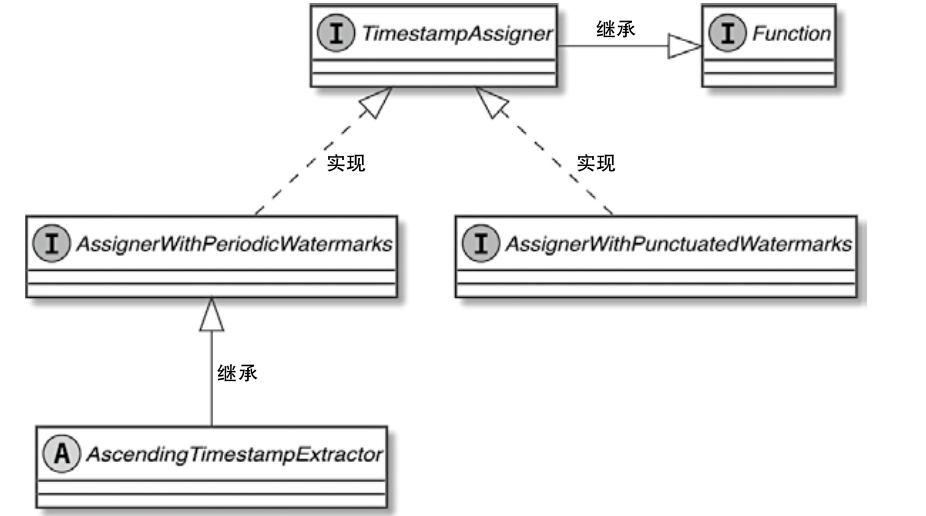
TimestampAssigner 类图
Event Time and Watermarks
- Processing Time: Uses the system clock.
- Ingestion Time: Captures the time when an event enters Flink.
- Event Time: Uses the timestamp within the event, requiring Watermarks to handle late events.
What is a Watermark
- Watermarks help Flink understand the progress of event time.
- Flink periodically generates watermarks to indicate that all events with timestamps up to a certain point have arrived.
- They allow Flink to handle out-of-order events.
How Watermarks Work?
- Watermarks are assigned to events (e.g., “current max timestamp - allowed lateness”).
- Flink processes events only when their timestamps are less than the watermark.
- Late events (events arriving after the watermark) can be discarded or sent to a side output.
TimerService
TimerService in Flink is a crucial component that allows stateful operators (like KeyedProcessFunction) to schedule and manage timers based on event time or processing time. It helps implement time-driven processing such as
- Handling inactivity detection (e.g., user inactivity in streaming applications)
- Triggering periodic computations (e.g., aggregations every 5 minutes)
- Cleaning up state after a timeout
一个例子
 1
 2
 3
 4
 5
 6
 7
 8
 9
10
11
12
13
14
15
16
17
18
19
20
21
22
23
24
25
26
27
28
29
30
31
32
33
34
35
36
37
38
39
40
41
42
43
44
45
46
47
48
49
50
51
52
53
54
55
56
57
58
59
60
61
62
63
|
public class FlinkTimerServiceExample {
    public static void main(String[] args) throws Exception {
        StreamExecutionEnvironment env = StreamExecutionEnvironment.getExecutionEnvironment();
        env.setParallelism(1);

        DataStream<UserEvent> userStream = env
                .fromElements(
                        new UserEvent("Alice", 1000L),
                        new UserEvent("Bob", 3000L),
                        new UserEvent("Alice", 7000L),
                        new UserEvent("Bob", 20000L)
                )
                .assignTimestampsAndWatermarks(
                        WatermarkStrategy.<UserEvent>forBoundedOutOfOrderness(Duration.ofSeconds(2))
                                .withTimestampAssigner((event, timestamp) -> event.timestamp)
                );

        KeyedStream<UserEvent, String> keyedStream = userStream.keyBy(event -> event.user);
        DataStream<String> alerts = keyedStream.process(new InactivityTimer());
        alerts.print();
        env.execute("Flink TimerService Example");
    }

    public static class UserEvent {
        public String user;
        public long timestamp;
        public UserEvent(String user, long timestamp) {
            this.user = user;
            this.timestamp = timestamp;
        }
    }

    public static class InactivityTimer extends KeyedProcessFunction<String, UserEvent, String> {
        private transient ValueState<Long> lastActivityState;

        @Override
        public void open(Configuration parameters) {
            ValueStateDescriptor<Long> descriptor = new ValueStateDescriptor<>(
                    "lastActivityState", Long.class);
            lastActivityState = getRuntimeContext().getState(descriptor);
        }

        @Override
        public void processElement(UserEvent event, Context ctx, Collector<String> out) throws Exception {
            long eventTime = event.timestamp;
            lastActivityState.update(eventTime);
            ctx.timerService().registerEventTimeTimer(eventTime + 10_000);

            out.collect("user " + event.user + " timestamp " + eventTime + " hsa activity.");
        }

        @Override
        public void onTimer(long timestamp, OnTimerContext ctx, Collector<String> out) throws Exception {
            Long lastActivity = lastActivityState.value();

            // Check that the timestamp when the timer is triggered matches the last active time
            if (lastActivity != null && timestamp == lastActivity + 10_000) {
                out.collect("warn: user " + ctx.getCurrentKey() + " has been silent for 10 seconds since "
                        + lastActivity + ".");
            }
        }
    }
}
|
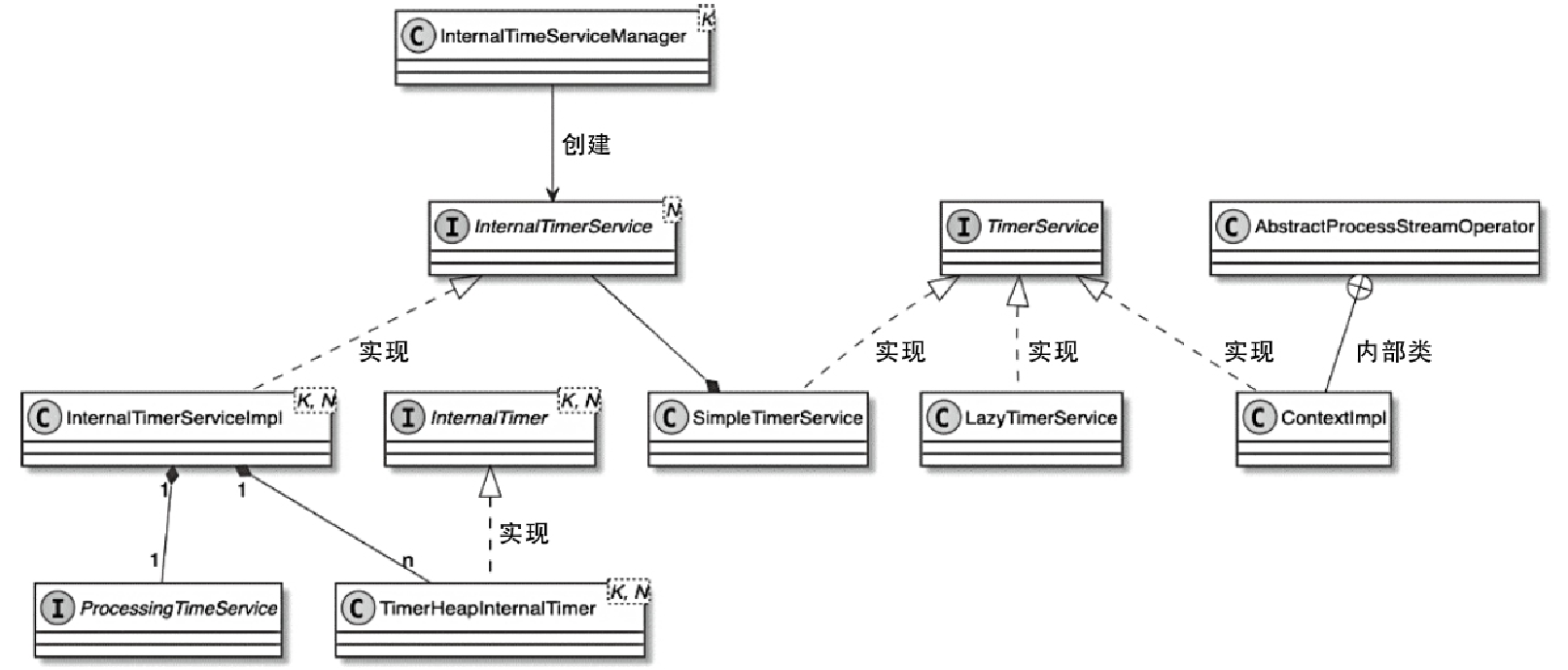
TimerService 类图
- 对于需要依赖时间定时器进行数据处理的算子来讲,需要借助TimerService组件实现对定时器的管理
- 其中定时器执行的具体处理逻辑主要通过回调函数定义
- 每个StreamOperator在创建和初始化的过程中,都会通过InternalTimeServiceManager创建TimerService实例
- 这里的InternalTimeServiceManager管理了Task内所有和时间相关的服务,并向所有Operator提供创建和获取TimerService的方法
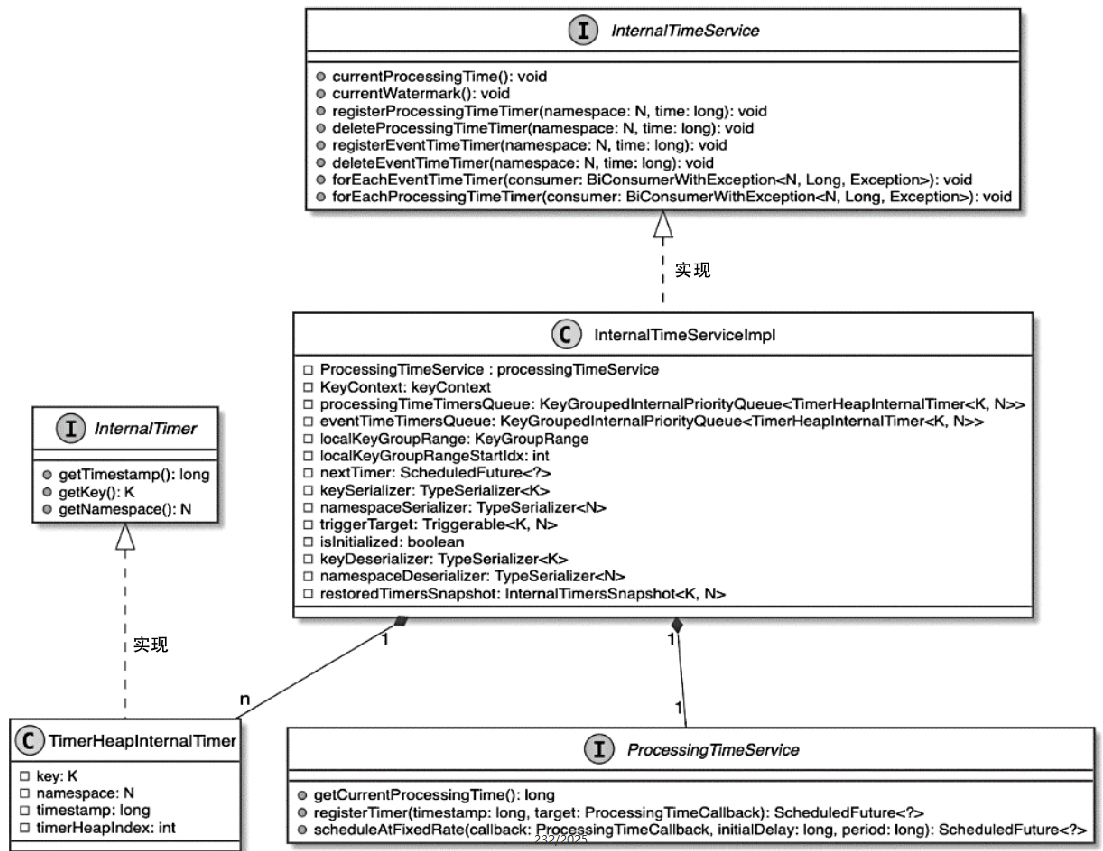
InternalTimerService 类图
- TimerService实际上将InternalTimerService进行了封装,然后供StreamOperator中的KeyedProcessFunction调用
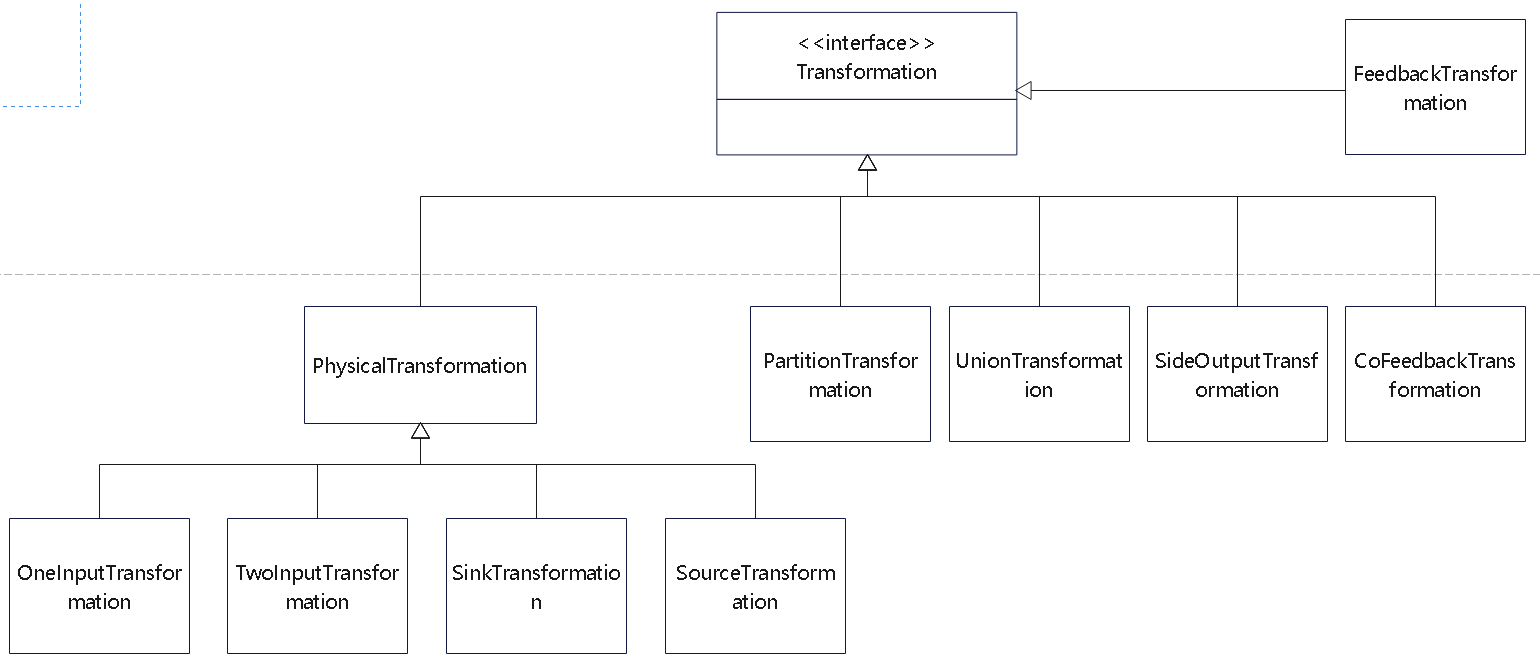
DataStream核心转换
物理算子的类图
KeyedStream
- 最终会调用:PartitionTransformation
- 主要是对数据元素在上下游算子之间进行重新分区
 1
 2
 3
 4
 5
 6
 7
 8
 9
10
11
12
13
14
|
    public KeyedStream(
            DataStream<T> dataStream,
            KeySelector<T, KEY> keySelector,
            TypeInformation<KEY> keyType) {
        this(
                dataStream,
                new PartitionTransformation<>(
                        dataStream.getTransformation(),
                        new KeyGroupStreamPartitioner<>(
                                keySelector,
                                StreamGraphGenerator.DEFAULT_LOWER_BOUND_MAX_PARALLELISM)),
                keySelector,
                keyType);
    }
|
| DataStream 物理转换操作 |
StreamPartitioner |
分区器说明 |
| keyBy |
KeyGroupStreamPartitioner |
数据根据 Key 进行分组,然后发送到下游 Task,按照 Key group index 选择 InputChannel |
| shuffle |
ShufflePartitioner |
数据均匀分发到下游 Task,且随机选择 InputChannel |
| rebalance |
RebalancePartitioner |
数据均匀分发到下游 Task,且循环选择 InputChannel |
| rescale |
RescalePartitioner |
数据均匀分发到下游 Task,且在本地循环选择 InputChannel |
| global |
GlobalPartitioner |
数据全部发送到下游第一个 Task 实例 |
| broadcast |
BroadcastPartitioner |
数据被广播发送到下游每一个 Task 中 |
| forward |
ForwardPartitioner |
上下游并行度一样时进行一对一发送,不发生分区变化 |
| custom |
CustomPartitionerWrapper |
用户自定义分区器 |
StreamPartitioner数据分区
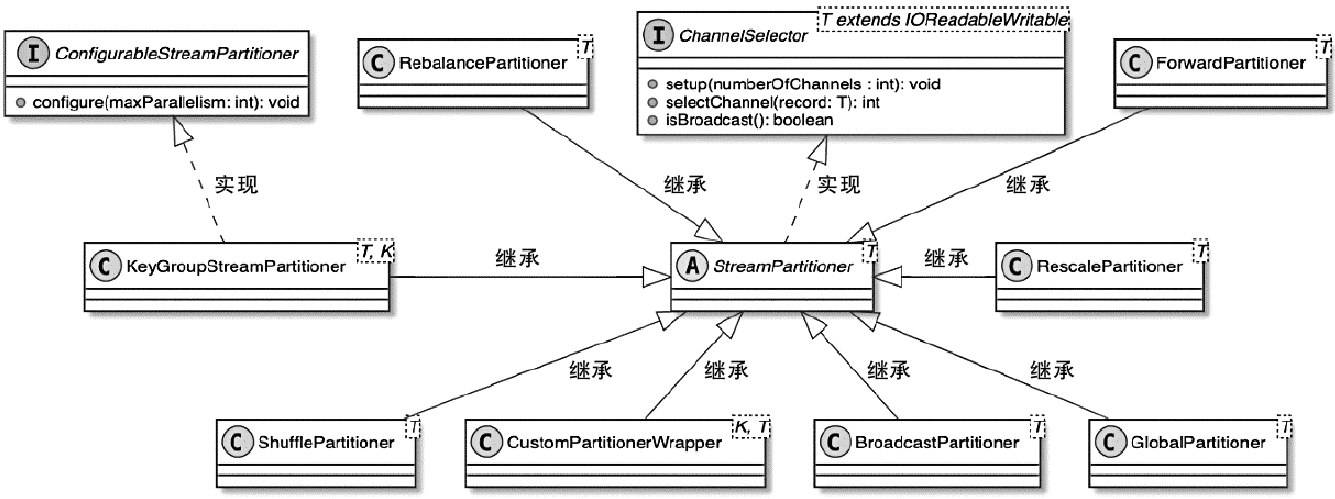
- 对数据按照Key进行分组,然后根据Key的分组确定数据被路由到哪个下游的算子中
- KeyGroupStreamPartitioner实际上继承自StreamPartitioner抽象类,而StreamPartitioner又实现了ChannelSelector接口,用于选择下游的InputChannel
StreamPartitioner 类图
DataStream 的 windows 转换
1
2
3
4
|
public <W extends Window> WindowedStream<T, KEY, W> window(WindowAssigner<?
   super T, W> assigner) {
   return new WindowedStream<>(this, assigner);
}
|
WindowAssigner
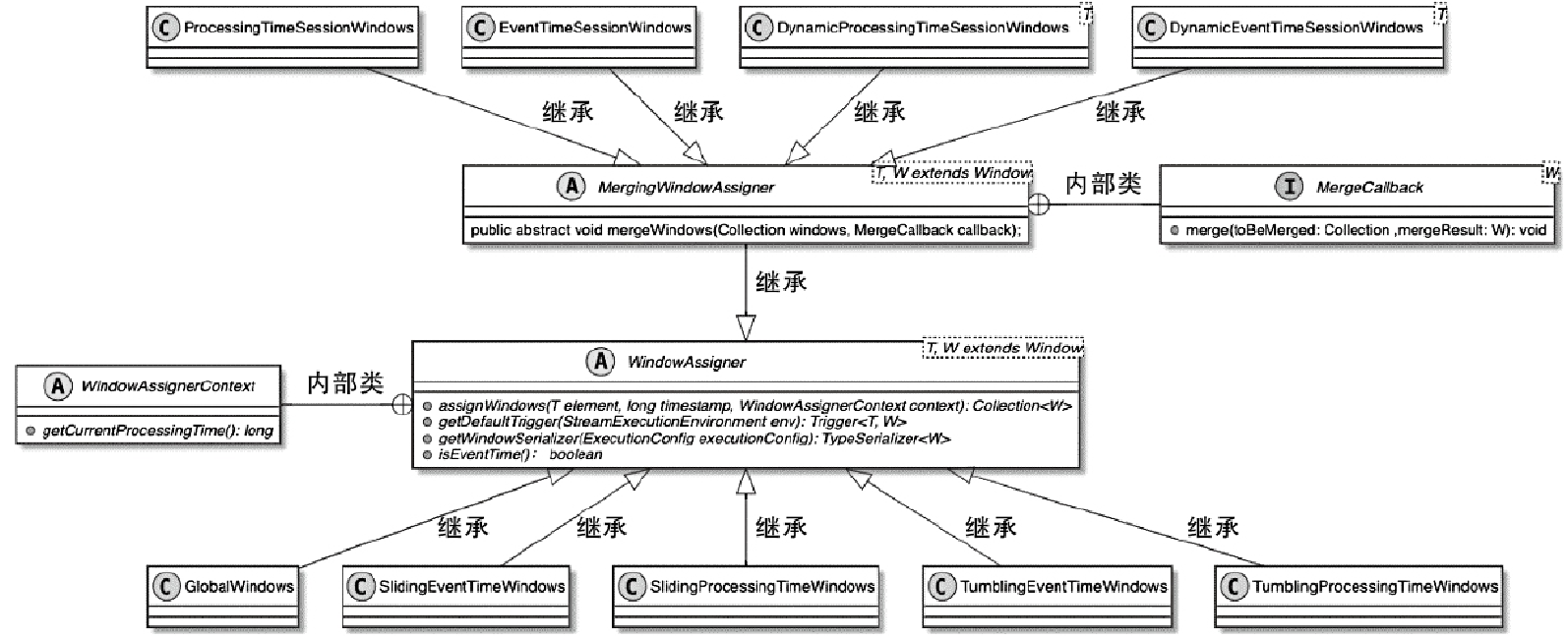
- 这里的 session 窗口比较特殊,其他都是差不多的
WindowFunction 类图
参考